Welcome to Chi Suite — P2014S4
Property: Edgewater Residence XIV
Address: 2014 W 100th Street, Cleveland, OH 44102
Room: Chi Suite (P2014S4), second floor
1. Complete your virtual check-in
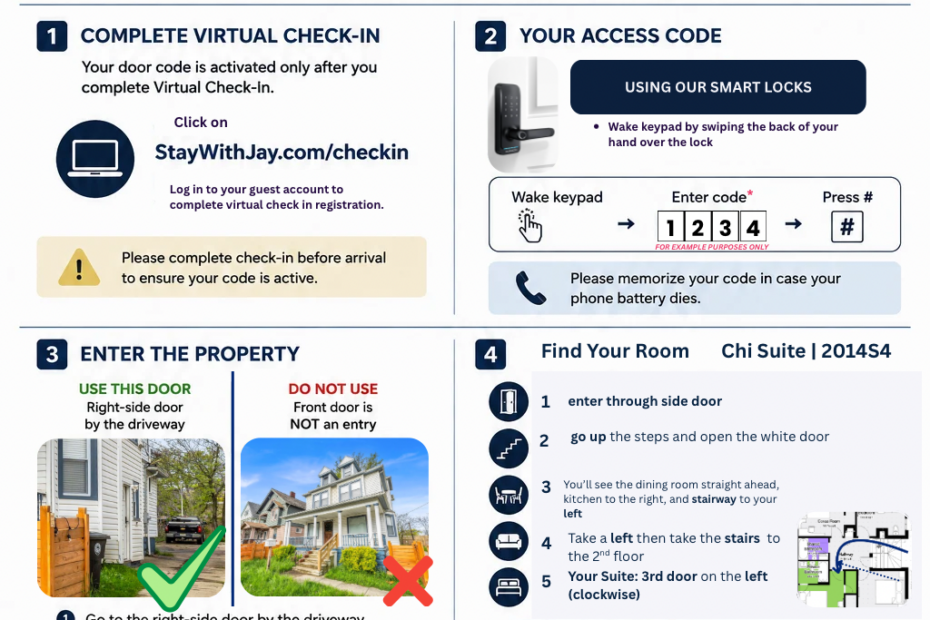
Before arrival, complete your virtual check-in registration at StayWithJay.com/checkin. Your door code is activated only after you complete virtual check-in.
2. Use your access code
Your access code is sent through your booking platform and email. To use the smart lock, wake the keypad by swiping the back of your hand over the lock. Enter your four-digit code and press #. Your bedroom door uses the same code. Please memorize your code in case your phone battery dies.
3. Enter the property
Use the right-side door by the driveway. Do not use the front door; it is not an entrance.
- Go to the right-side door by the driveway.
- Swipe your hand on the keypad to wake it.
- Enter your four-digit code.
- Press #.
4. Find Chi Suite (P2014S4)
- Enter through the side door.
- Go up the steps and open the white door.
- You will see the dining room straight ahead, the kitchen to the right, and the stairway to your left.
- Take a left, then take the stairs to the second floor.
- Chi Suite is the third door on the left (clockwise).
Your bedroom door uses the same access code.
5. Bathrooms
Chi Suite has its own full bathroom. There are also two shared bathrooms in the residence. Please clean up after use and do not leave personal items behind.
Parking
For parking information, please ask StayWithJay for the applicable parking instructions. See also our parking information.
Need assistance?
Message us through your booking app or text 440-941-0668.
Check-in: 4:00 PM or after. Check-out: 10:00 AM or before.